
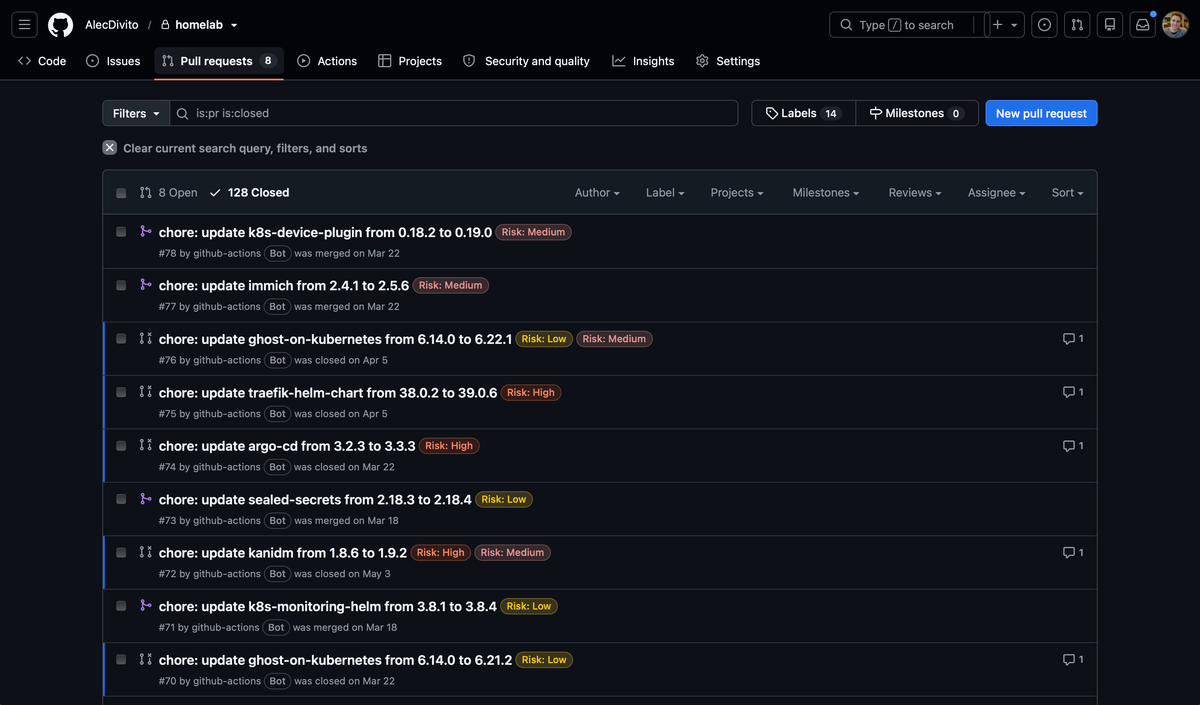
Homelabs are notoriously hard to keep up to date. I would know - I've been running one for over 2 years!
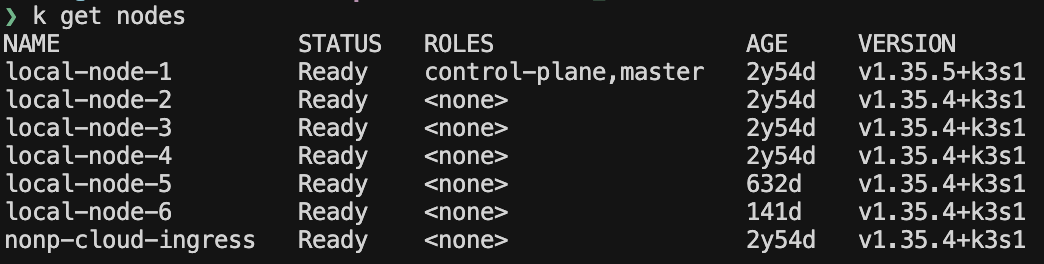
With it, I've deployed many open source applications. Some I've kept while others didn't make the cut. I'm picky. Deploying and maintaining software can be a huge headache. However through lots of testing I've found a happy medium running about 10 applications with another 8 that support cluster operations.
After all of this time, the same problem always reappeared. When life got busy, keeping the open source software up to date was a struggle. I found that I didn't have the time to manually check each release and validate if I wanted it deployed on my cluster now or later.
I got tired of pretending I'd check the release notes for my 18+ services every day/week/month or even year. So, I built something to do that for me.
Version Update Action
GitOps-friendly version bumps with optional AI sanity checks
Kubernetes Version Update Action is a GitHub Action I wrote for my own homelab GitOps repo. It runs on a schedule, checks upstream for newer releases, updates the version fields in a YAML file, and opens a Pull Request.
That's it. That's the whole pitch.
The tool is compatible with any GitOps application as it only operates on the yaml files themselves. No access to the underlying cluster required.
Why not just use Dependabot / Renovate?
Valid question, I asked it too.
Dependabot and Renovate are excellent at what they do — bumping dependencies in package.json, go.mod, Dockerfiles, that sort of thing. My homelab isn't really that. It's a pile of Kubernetes manifests and Helm charts. These tools are quite complex and do a lot more than what I actually need.
My understanding is that these applications also depend on 3rd party services existing to operate. The solution I was looking for was a lot simpler and I wanted a smaller code base where I knew everything going on. It's purpose built just to only handle updating versions and keeping pull requests and branches up to date for GitOps style repositories.
This action is very purpose-built for my GitOps workflow. YMMV.
How it works
At a high level, this is a GitHub Action that takes an input of:
- What repository should the source version target
- What source file needs to be synced with the repository target version
- Where in the file do I need to make the edit.
Those are the 3 required pieces of information that needs to be answered and the GitHub action will do the rest. It will
- Go to the repository (if it has access), check the releases and get the latest version
- Compare the latest version with the target version in the source file
- If the source number is lower, create a pull request
The are extra settings for cases where you might want to lag some releases. Same with dealing with repositories that release multiple projects under the same repository.
How I use it
The GitHub action is really simple. I pair it with a configuration file to make it more powerful. Let me show you how I format my (example) application file:
applications:
  - repo: 'traefik/traefik-helm-chart'
    type: 'helm'
    file: 'apps/templates/traefik.yaml'
    path: 'spec.source.targetRevision'

  - repo: 'busybox'
    source: 'dockerhub'
    type: 'kubernetes'
    targets:
      - file: 'services/adguard/deployment.yaml'
        path: 'spec.template.spec.initContainers.0.image'
      - file: 'services/vpn/wg-portal/deployment.yaml'
        path: 'spec.template.spec.initContainers.0.image'

  - repo: 'argoproj/argo-cd'
    type: 'manual'
    version: '2.10.1'
    description: |
      ArgoCD is managed via a manual install script. When upgrading:
      1. Run 'kubectl apply -n argocd -f https://raw.githubusercontent.com/argoproj/argo-cd/v{{version}}/manifests/install.yaml'
      2. Verify all pods are running.
Here I am maintaining 3 applications. A helm chart with Traefik configured, BusyBox's for doing some scripting before services launch and Argocd which I manually maintain.
You can see that for Traefik and ArgoCD it will go to their GitHub repositories and get the latest releases. But for BusyBox, it will actually check docker hub.
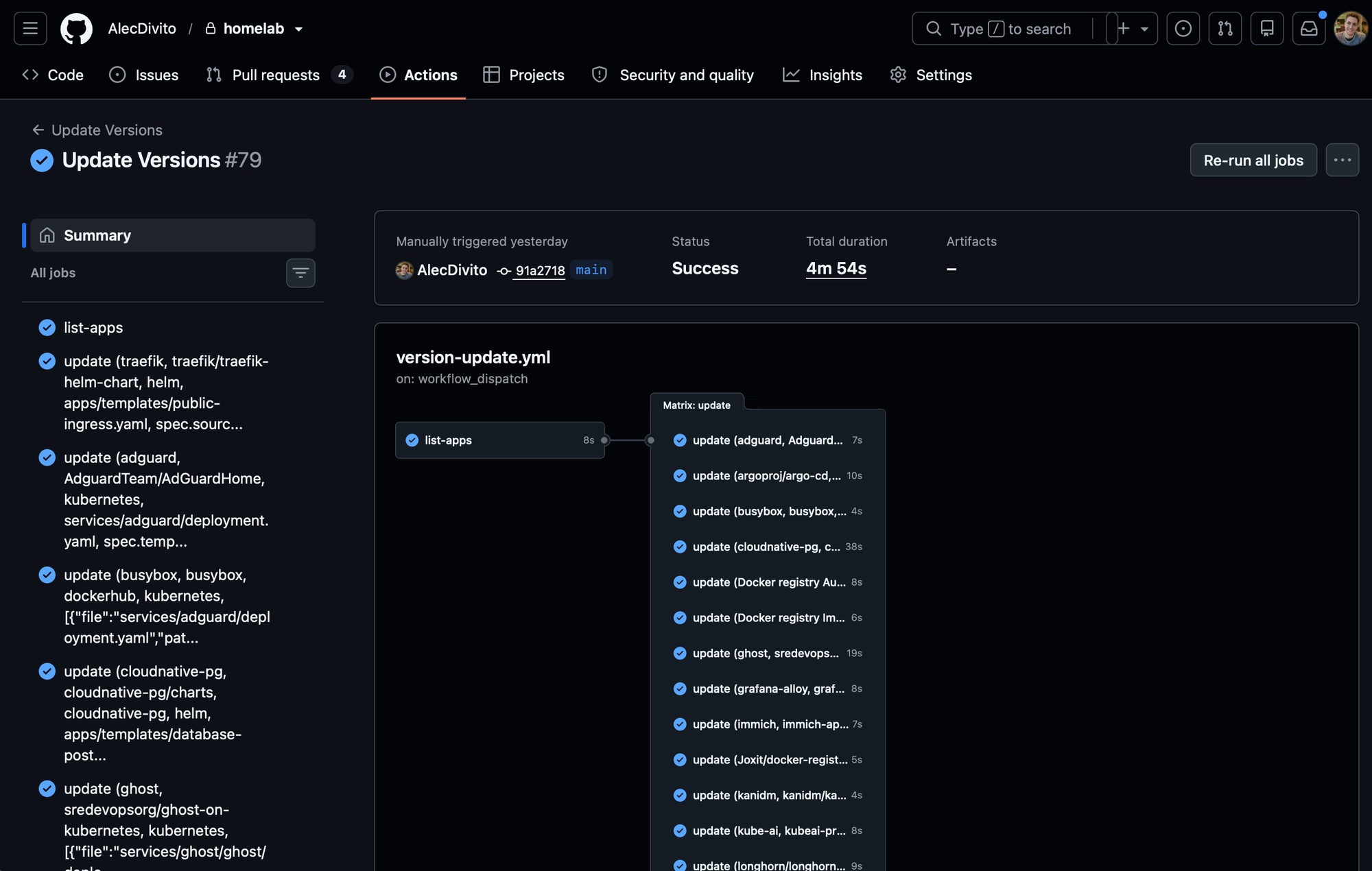
I use this file with an accompanying GitHub workflow:
name: Update Versions

on:
  schedule:
    - cron: '0 0 * * *'
  workflow_dispatch:

jobs:
  list-apps:
    runs-on: ubuntu-latest
    outputs:
      matrix: ${{ steps.set-matrix.outputs.matrix }}
    steps:
      - uses: actions/checkout@v4
      - id: set-matrix
        run: |
          npm install js-yaml
          node -e "
          const fs = require('fs');
          const yaml = require('js-yaml');
          const config = yaml.load(fs.readFileSync('versions-config.yaml', 'utf8'));
          const matrix = {
            include: config.applications.map(app => ({
              ...app,
              targets: app.targets ? JSON.stringify(app.targets) : ''
            }))
          };
          console.log('matrix=' + JSON.stringify(matrix));
          " >> $GITHUB_OUTPUT

  update:
    needs: list-apps
    runs-on: ubuntu-latest
    strategy:
      fail-fast: false
      max-parallel: 1
      matrix: ${{ fromJson(needs.list-apps.outputs.matrix) }}
    steps:
      - uses: actions/checkout@v4
      - uses: alecdivito/kubernetes-version-update-action@v1
        with:
          github_token: ${{ secrets.GITHUB_TOKEN }}
          repo: ${{ matrix.repo }}
          type: ${{ matrix.type }}
          source: ${{ matrix.source || 'github' }}
          targets: ${{ matrix.targets }}
          openai_api_key: ${{ secrets.OPENAI_API_KEY }}
          openai_model: ${{ secrets.OPENAI_MODEL }}
          config_file: 'versions-config.yaml'
Now the GitHub action, paired with the application file, will loop over each record and will:
- Reads the current version from the configured YAML path (or from config for manual apps)
- Fetches releases from GitHub or Docker Hub
- Optionally applies version lag — stay one minor behind, for example
- Updates every configured target file
- Commits to a
bot/update-*branch - Opens or updates a PR
Features
I covered some very simple examples of how to re-create my setup above. Now, I'll cover all of the actual features that are included in this initial release of the Version Update Action.
Multiple targets
One application, many YAML files. Busybox shows up as an init container in two deployments — onerepo entry, multiple targets. They all bump together at the same time.
- name: vpn
  repo: h44z/wg-portal
  type: kubernetes
  targets:
    - file: services/vpn/wg-portal/deployment.yaml
      path: spec.template.spec.containers.0.image
    - file: "services/vpn/wg-portal/deployment.yaml"
      path: "spec.template.spec.initContainers.0.image"
Managing manual upgrades
type controls how the version gets written back:
kubernetes— updates an image tag (nginx:1.25→nginx:1.26)helm— updates a chart revision (spec.source.targetRevisionin an ArgoCD Application)manual— means there are no YAML field to patch; tracks version in the configuration file and opens a PR when upstream moves. Thedescriptionlands in the PR body to remind you how to do the manual upgrade.
- repo: 'argoproj/argo-cd'
  type: 'manual'
  version: '2.10.1'
  description: |
    Run kubectl apply -n argocd -f https://raw.githubusercontent.com/argoproj/argo-cd/v{{version}}/manifests/install.yaml
GitHub releases and Docker Hub images
source defaults to github. Point at dockerhub when the version lives on an image tag instead of a GitHub release.
- repo: 'busybox'
  source: 'dockerhub'
  type: 'kubernetes'
  targets:
    - file: 'services/adguard/deployment.yaml'
      path: 'spec.template.spec.initContainers.0.image'
Release filtering
Some repos publish dozens of releases from one repository — different binaries, different charts, different tags. releaseFilter narrows to the release you care about.
- name: "cloudnative-pg"
  repo: cloudnative-pg/charts
  releaseFilter: "cloudnative-pg"
  type: "helm"
  file: "apps/templates/database-postgres-operator.yaml"
  path: "spec.source.targetRevision"
Version lag
Immich taught me fear. versionLag: 1 with versionLagDepth: 'minor' means “skip the newest minor — give me the previous one.” Let other homelabs find the migration bugs first. I’ll upgrade next week. Maybe.
- name: immich
  repo: immich-app/immich
  type: kubernetes
  targets:
    - file: services/immich/backend-app/deployment.yaml
      path: spec.template.spec.containers.0.image
    - file: services/immich/ml-app/deployment.yaml
      path: spec.template.spec.containers.0.image
    - file: services/immich/web-app/deployment.yaml
      path: spec.template.spec.containers.0.image
  versionLag: 1 # Stay one version behind
  versionLagDepth: 'minor' # 'major' or 'minor' (default: minor)
AI release-note summaries
Optional, but the reason I actually read PRs now. Point it at any OpenAI-compatible API and it reads the release notes between your current and target version. The PR gets a risk rating (None → High), a short summary, and labels like Risk: Low or Worry-free.
Pull request hygiene
One PR per application, per target version. If a newer release drops before you merge, the old branch gets closed and a fresh PR opens. No pile of stale bot/update-* branches to triage.
In conclusion
If you read this far, you should probably just give it a try!
 AlecDivito
Maintaining a Homelab doesn't need to be a pain to keep applications up to date. Time is limited and as I move from playing with applications to using them.
Version Update Action doesn't make upgrading painless. Nothing does. What it does is remove the friction between "a new version exists" and "here's a reviewed, labeled PR waiting in my queue." For a GitOps homelab with dozens of customized services, that friction was the thing stopping me from staying current at all times.
The apps will keep coming and going. At least now the ones that stay won't silently rot on a year-old patch version because I forgot to check GitHub releases on a Wednesday.
If you're running a similar setup, you might find this useful.