8 years ago I wanted to learn about web assembly using the best programming language in the world, Rust. I was coming hot off of the heels of completing my minesweeper clone in React and was thinking about how I could drop React and program at a lower level.
What are you reading this article for when you can do the much more fun thing which is play the game and record your high score!
The plan was simple, use great tools like Webpack, Typescript and this cool build tool called Wasm-pack to get a Rust binary running in the browser. The Rust program would contain all of the logic for the game while the rendering logic would live in the browser.
The way to connect a Rust program with the browser is as simple as adding a dependancy called wasm-bindgen and web_sys. Wasm-bindgen would help generate the bindings so the Rust library would transform into a javascript library that could be included in the project. Web_sys would then given the library access to some of the browsers native API's like the random number generator, which we'd need to create the pieces.
I thought this was really cool (I still do). For example the following struct definition in rust...
#[wasm_bindgen]
#[repr(u8)]
#[derive(Clone, Copy, PartialEq, Eq)]
pub enum Cell {
    I = 0,
    O = 1,
    T = 2,
    S = 3,
    Z = 4,
    J = 5,
    L = 6,
    EMPTY = 7,
}
Would become the following javascript...
/**
 * A Cell is a byte representation of a possible pieces value
 * @enum {0 | 1 | 2 | 3 | 4 | 5 | 6 | 7}
 */
export const Cell = Object.freeze({
    I: 0, "0": "I",
    O: 1, "1": "O",
    T: 2, "2": "T",
    S: 3, "3": "S",
    Z: 4, "4": "Z",
    J: 5, "5": "J",
    L: 6, "6": "L",
    EMPTY: 7, "7": "EMPTY",
});
Along with the accompanying Typescript definitions...
/**
 * A Cell is a byte representation of a possible pieces value
 */
export enum Cell {
    I = 0,
    O = 1,
    T = 2,
    S = 3,
    Z = 4,
    J = 5,
    L = 6,
    EMPTY = 7,
}
With a demo of what was possible and being able to see the generated code, I had the confidence to start my project.
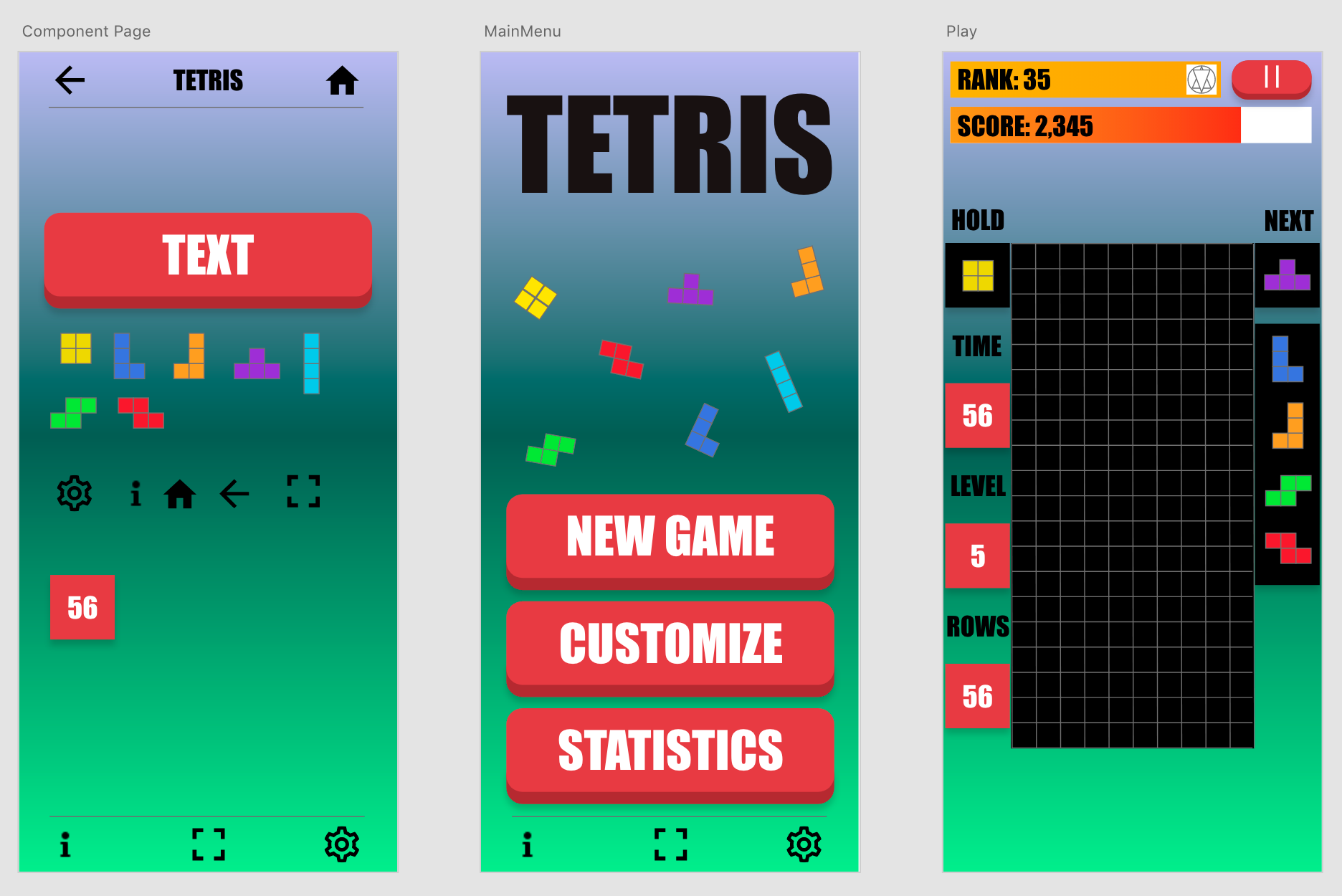
But remember, I started this 8 years ago, in 2018, a different time where you had to do all of the work. There was no AI to help you. At the time, I wanted to own the full stack from design to deployment so I created a high fidelity mockup to get an idea of what I was building.
...
Listen, I'm not a designer ok...
With that in had I got to implementing. I spent all of 2 days working on it (maybe 4 days) and theeeeeeeeeen, well life got in the way.
2026 has been the year of AI, where it's gotten really really good and do the majority of the programming. I used it a lot and was noticing my skills becoming dull. So I knew that I needed to make a change! Or have a hobby project just for fun...
But what to create?
Why not finish Tetris clone, once and for all!
Picking up where I left off
First thing I had to do was get the project building. Rust and Javascript have not been standing still and now there are lots more tools then there was back in 2018. We have AI and Webpack has gone from version 3 to version 5 with lots of breaking changes!
Fixing Webpack was a bit of a challenge which I used AI to help me figure out. The biggest issue I had was having legacy @import calls in my sass which the pulgin for Webpack didn't like very much, but I silenced those instead of updating the project 😄
I'm ok with this as I use tailwind 99% of the time now anyways.
By the end of the evening, I had my Tetris project, right where I left it.
Playing Tetris where I left off
Issues
After 8 years, I knew there were going to be some problems that I haven't fixed. There would be some missing features. There would be some bad style choices. All things that had to be fixed.
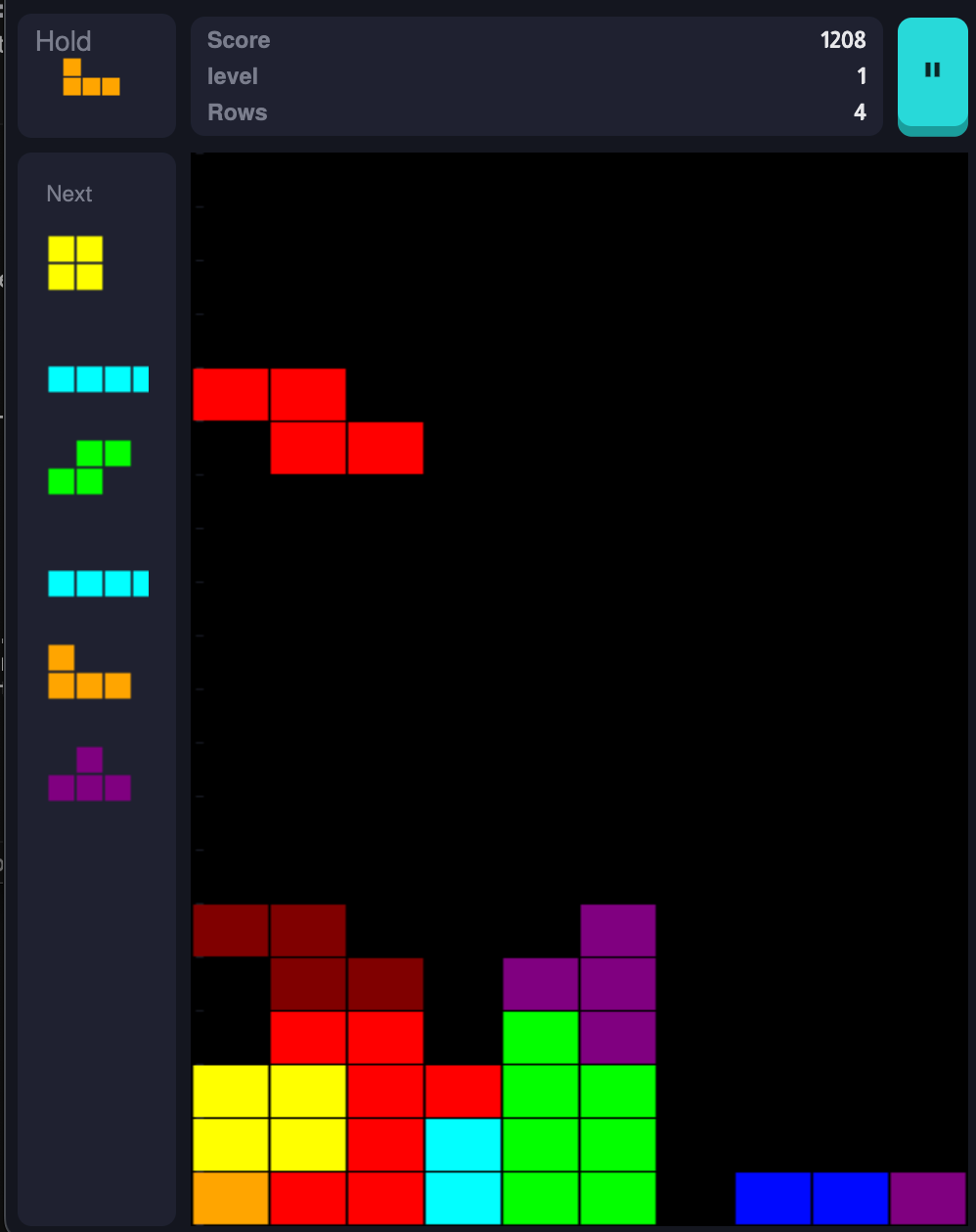
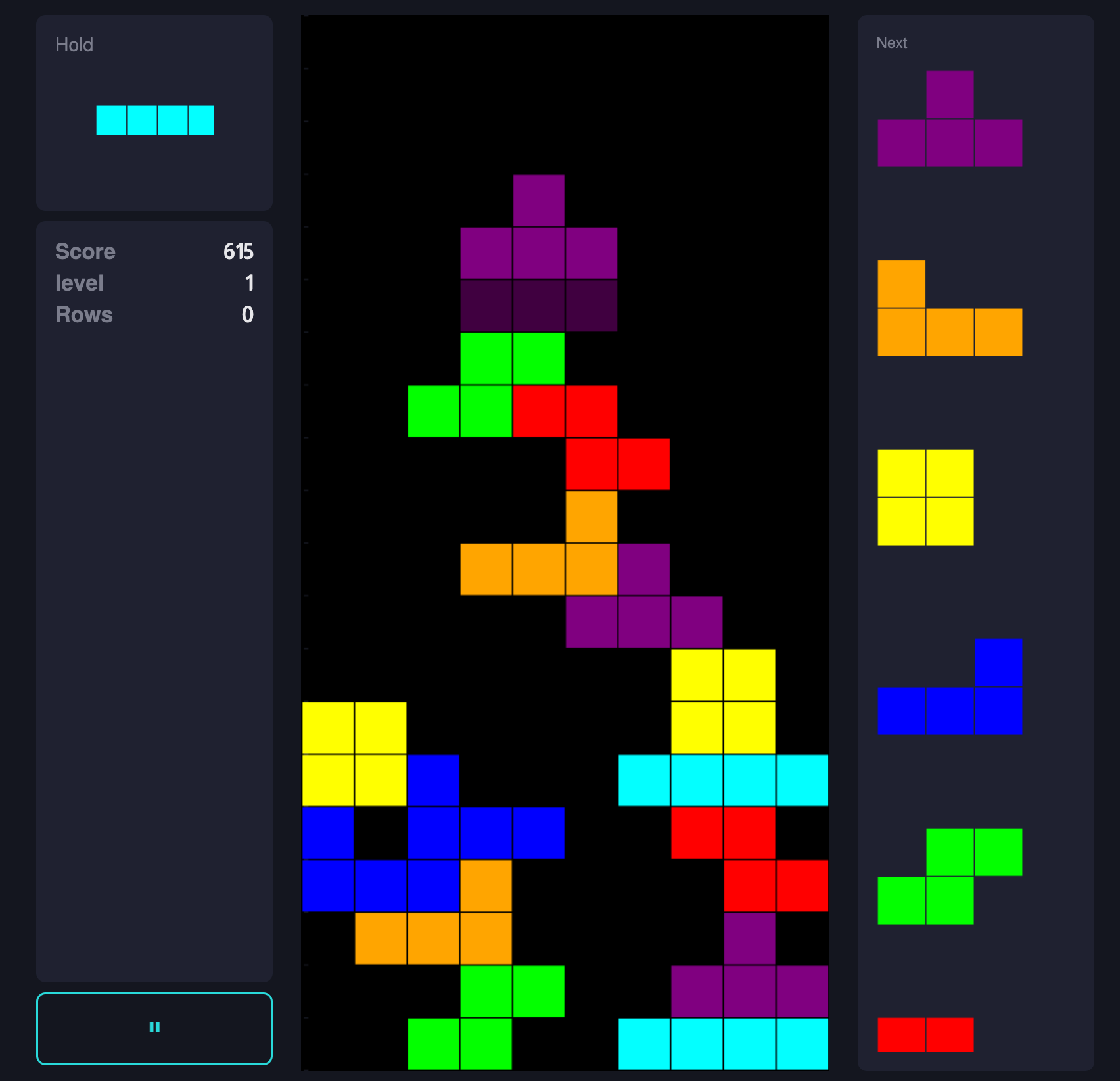
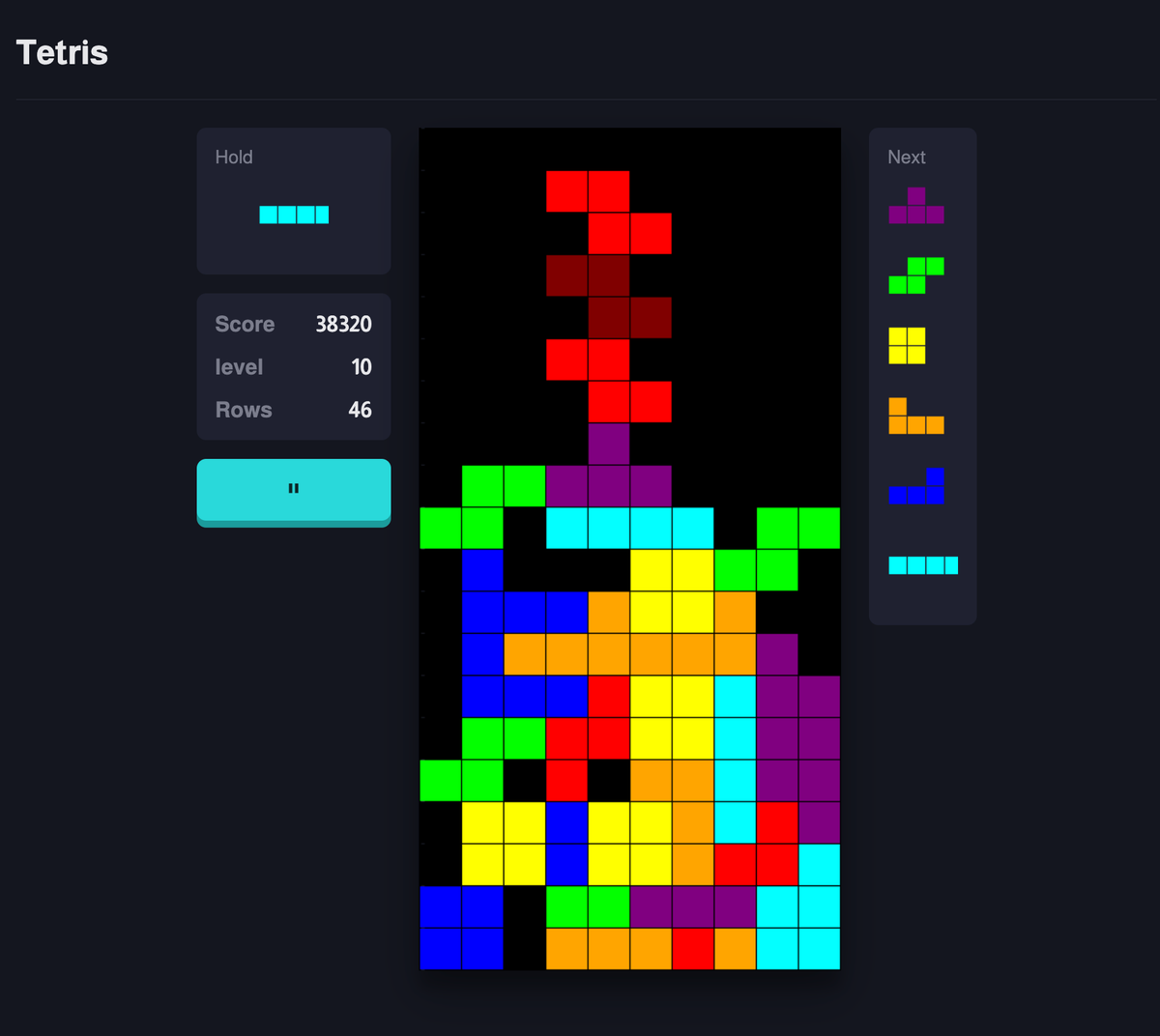
To get a good idea I decided to just play the game where I left off. I found the following:
- When rotating the active piece, on the corners if you did it to much it would go off of the screen.
- On complicated boards, the preview piece could show up above where the piece was meant to be.
- I had red top bars at the top for some reason (but all the style was bad)
- Rotations and movements would stay active if the button was held down
Rotation issues where piece ends up in the wall and piece preview issues
I guess my work is cut out for me. I wrote a test to confirm the behaviour and low and behold the following code...
 #[test]
  pub fn test_rotation() {
      let mut game = Game::new();
      let mut piece = Piece::new(Cell::I);
      let mut moves = [Action::RotateClockWise as u8, Action::MoveLeft as u8];
      piece.set_position(Point::new(0, 5));
      game.set_piece(piece);
      game.event_handler(&mut moves);

      game.merge_piece_into_board();
      let cells = game.get_cell_vec();
      game.print();
      assert_eq!(cells[game.get_index(7, 0)], Cell::I);
      assert_eq!(cells[game.get_index(7, 1)], Cell::I);
      assert_eq!(cells[game.get_index(7, 2)], Cell::I);
      assert_eq!(cells[game.get_index(7, 3)], Cell::I);
  }
Resulted in the board not rendering the piece correctly...
...
4
5
6          I
7 III
8
9
...
With a test reproducing the issue, I could get to solving it.
Working through the problems
Redoing all of the rotation work
I won't bore you with the details, but I got it working writing tests like the one I shown above. With preview pieces work and rotation working, I had a pretty decent game going on but something was missing...
A lot was missing.
Once I started reading the rules of the game, I noticed that Tetris required:
- Implementation of their actual rotation System Super Rotation System
- Scoring is more complex with this idea of T-Spins (what are those)
- There are different types of Lock delays. This is where you are still able to play with the piece once it touches a piece on that board.
- There are also different types of losing, or also called, Top out.
Implementing Super Rotation System
The rotation I had implemented was a matrix rotation around a pieces centre point. The rotations would happen on the game board directly. This wasn't the right idea though.
Tetris has its own rotation implementation system called Super Rotation System. You can read more here https://tetris.wiki/Super_Rotation_System (that's what I used anyways).
The basic idea of it is there are 2 physical spaces that exist.
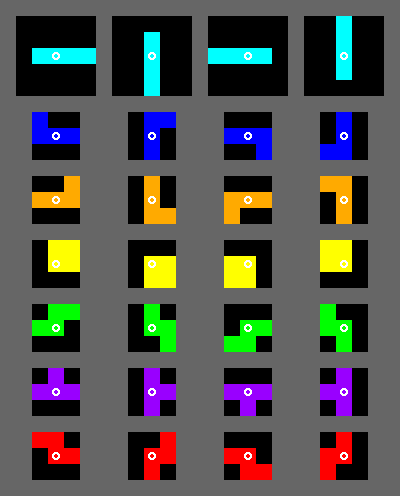
- The piece lives within its own bounding box. Most of the time this is a 3x3 grid while for the
Ipiece it's a 4x4 grid. Matrix rotations happen here. The below example shows all of the rotations the pieces should be able to perform.
- Pieces on the game board can kick themselves into different positions. This can cause the piece to do impossible moves over a normal rotation. The kick tables are actually pre-determined tables where when a normal local rotation can't work, it will check other rotations.
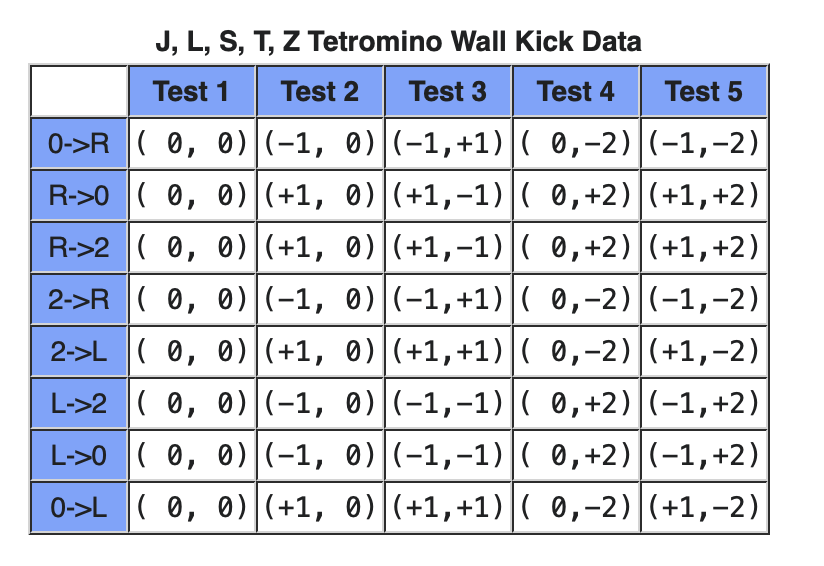
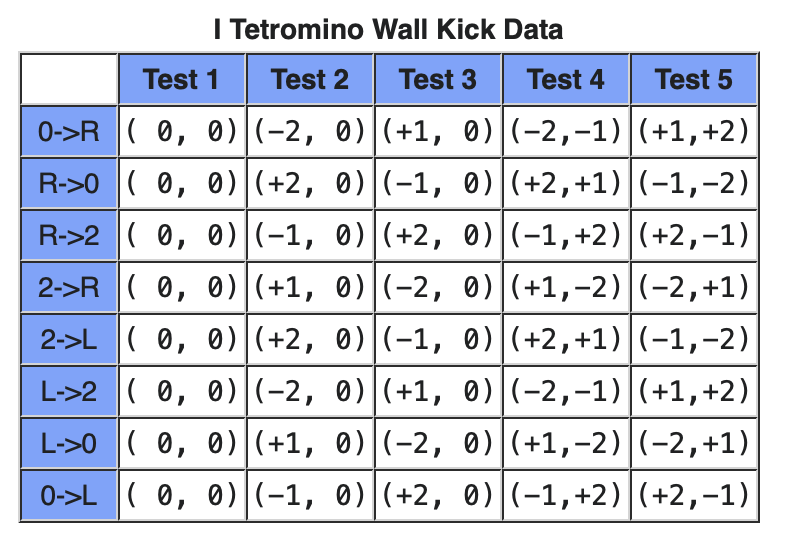
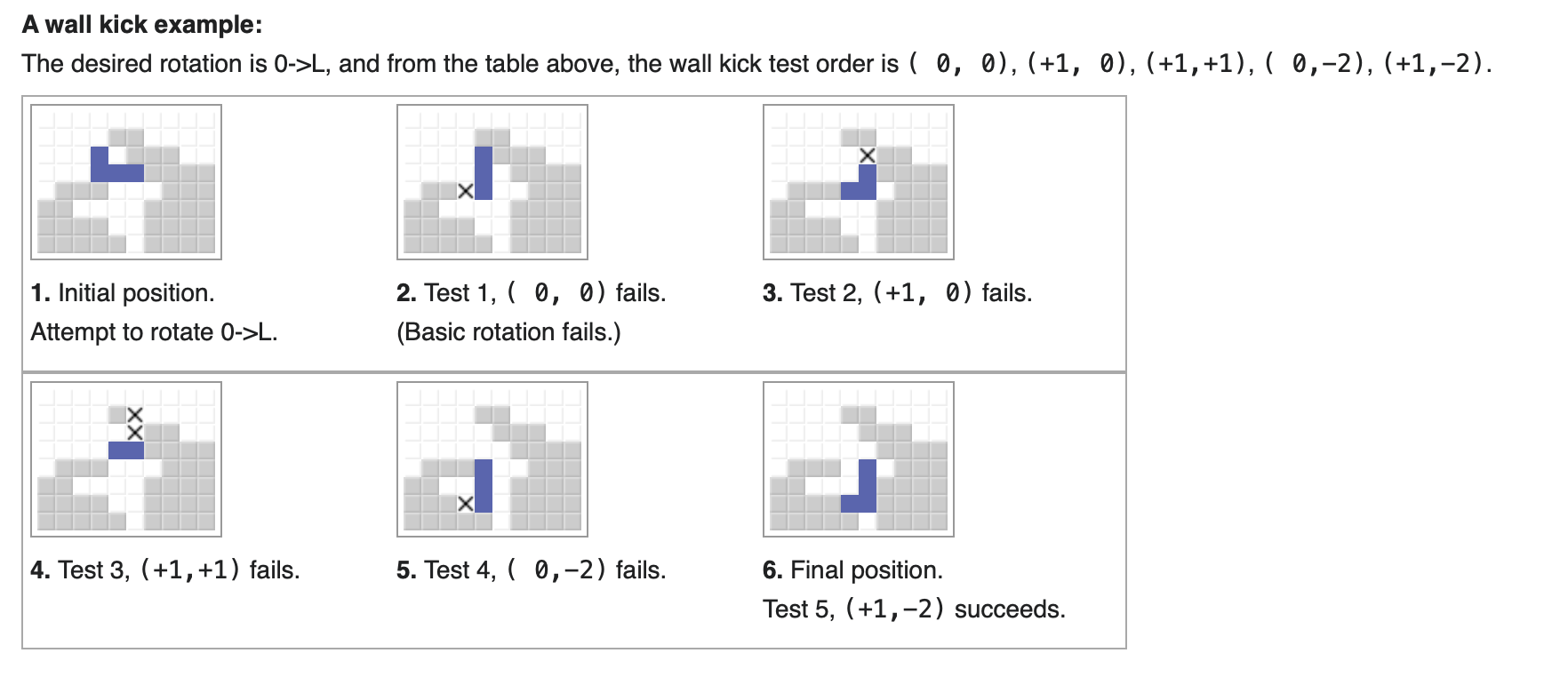
This was actually really easy to implement as once you self contain the matrix piece rotation inside of the local piece coordinates, you can then convert the position of the piece plus its local coordinates to the world space, and iterate through the 5 test rotations until a match was found.
Note I would show a video of this happening, but I'm actually horrible at setting up a test case and I'm a bit to lazy to create a running video showing it off, so you'll just have to trust or have AI read the code.
Updating scoring
When doing a bit more search, I also noticed my scoring wasn't implemented correctly. The initial implementation only had clearing rows but there are more complicated scenarios such as T-spins and getting difficult row completions back to back. Used the scoring sheet described here https://tetris.wiki/Scoring to update my implementation. If you are wondering, I recommend reading the linked article.
It's all relatively straight forward except for T-spins. So I'll explain in bullet point form of what their requirements are.
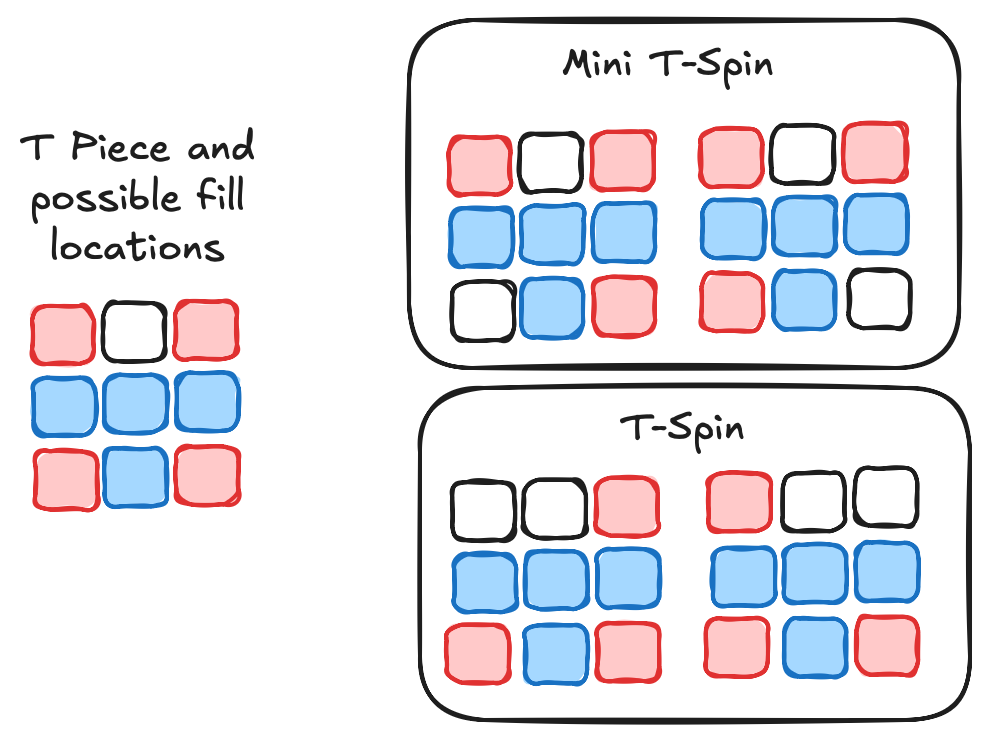
- T-Spins are only valid for the
Tpiece - For a T-Spin to be valid the last action on the piece must be a rotation
- A T-Spin must have 3 of it's 4 corners filled (of it's local space from the game board)
- A T-Spin is mini if only one of the spots next to the bottom of the
Tis filled. - A T-Spin (not mini) must have both piece next to the bottom of the
Tfilled.
- A T-Spin is mini if only one of the spots next to the bottom of the
Took a couple of prompts with AI to get the base requirements of what to implement.
Lock Delays
When pieces are falling they will at some point touch the bottom of the board or they will touch a piece. When that happens, what should the piece do?
Well it could Immediately lock. A lot of the first games of Tetris implemented this.
It could also have a set amount of time it exists for. It's standard for the piece to freeze for 500ms before locking to the board.
What's not standard is what resets that timer. One such example is Move Reset setting where any movement would reset the timer, with no limit. So a move left or right would reset the 500ms timer.
There is also Step Reset. This would only reset the timer if the movement or rotation resulted in the piece moving down on the y axis of the game board.
Finally there is the one I default to, Capped Reset. This is where any valid move or rotation resets the timer, but you have a max amount of moves and rotation to execute until the timer no longer resets. The default for this seems to be 15 and is the default setting I used in my implementation, but I did implement the other settings.
Top Out (or losing the game)
At the top of any Tetris board, this is a blank space that the user doesn't see. For example, in my implementation this space is 5 blocks large. It's where I spawn the pieces into the board.
This space is used for spawning pieces in and for determining if you lost the game.
For example the Block Out losing condition only triggers when a spawning piece fails to spawn because a piece of the board already exists in the location it would fill. With this setting you could have pieces going off the visible top of the board. I use this setting on default games.
Some implementations have Lock Out. This losing condition is triggered when the piece locks to the board in the invisible space.
Finally, there is the classic Top Out, which is self explanatory, once a piece is saved above the visible board, you lose.
Designing the game play
Hi Claude!
If you read the top of the article, you'll have notice my designs skills are quite poor and in 2026, for a basic game like this where I'm more interested in the game logic, I turned to Claude for the design implementation (using their generous free tier).
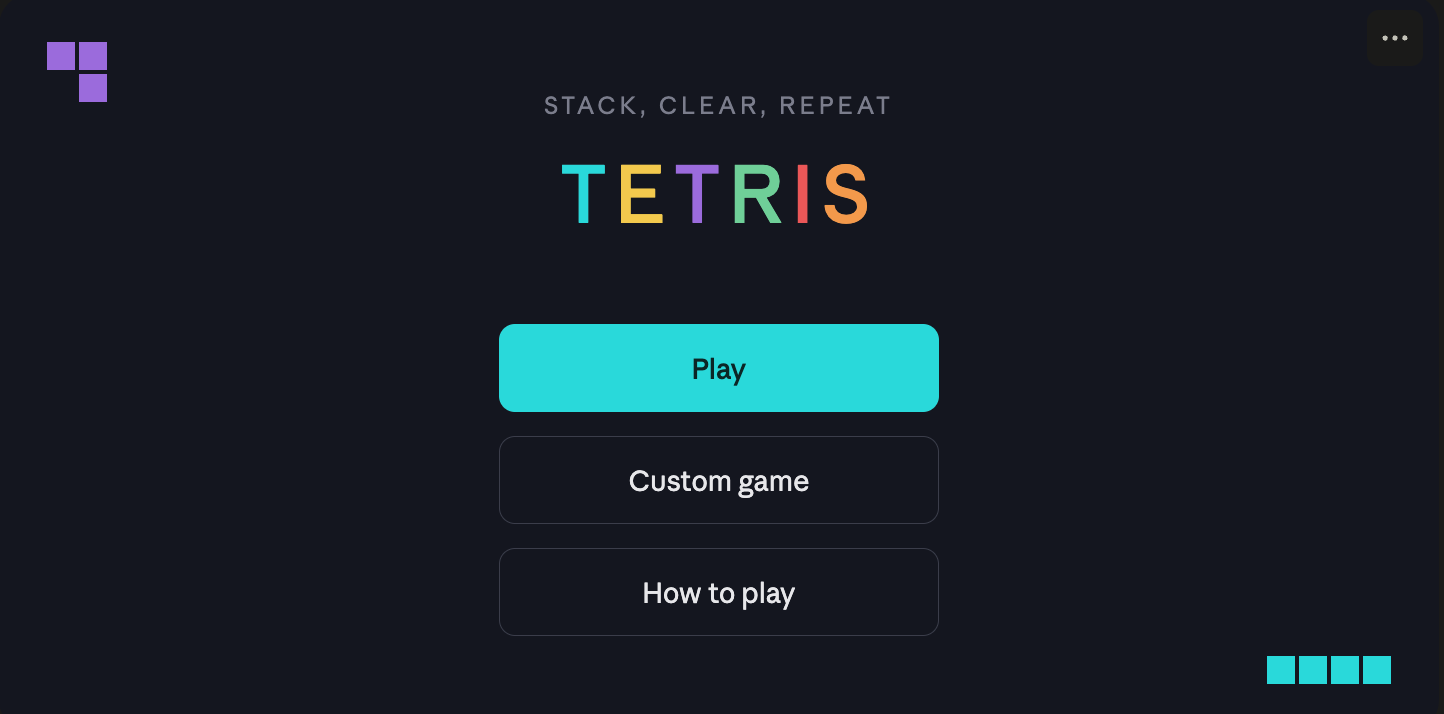
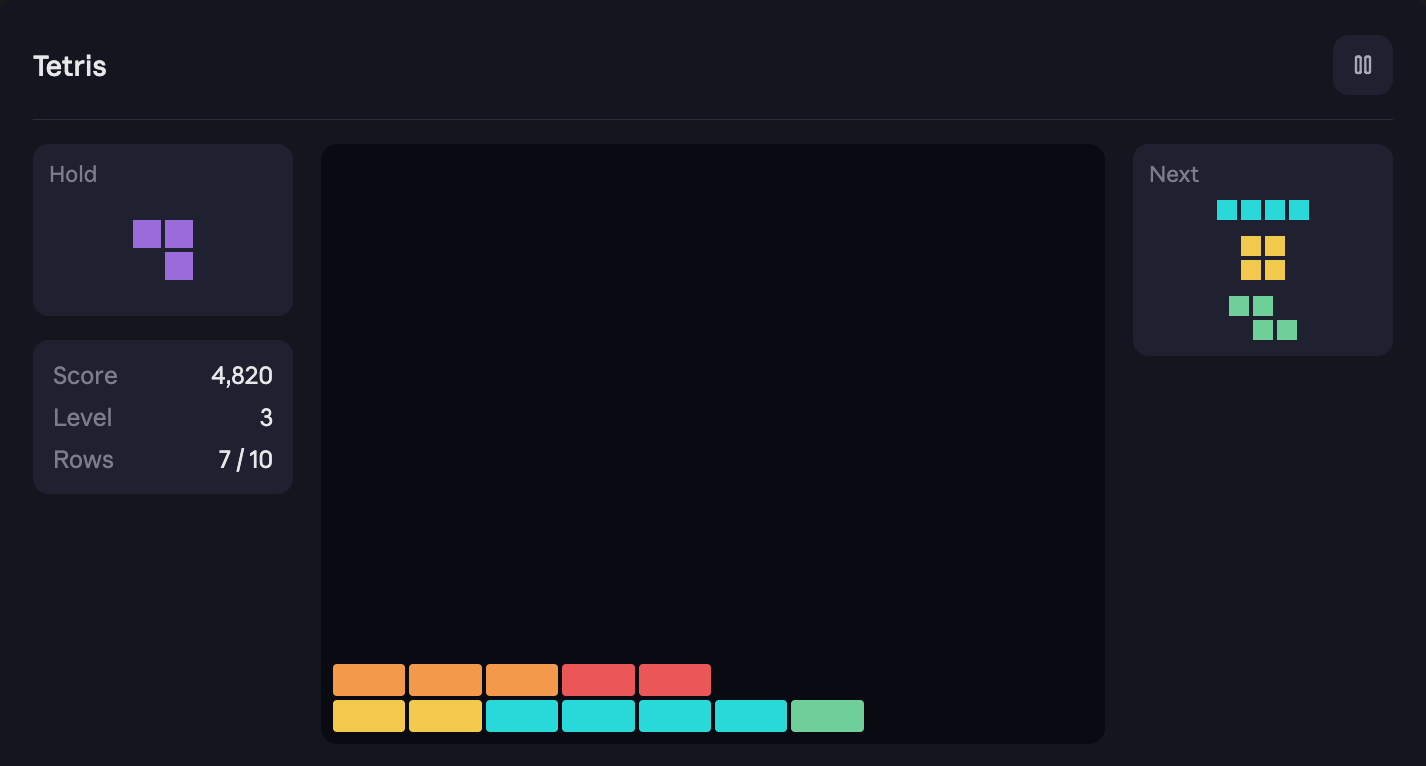

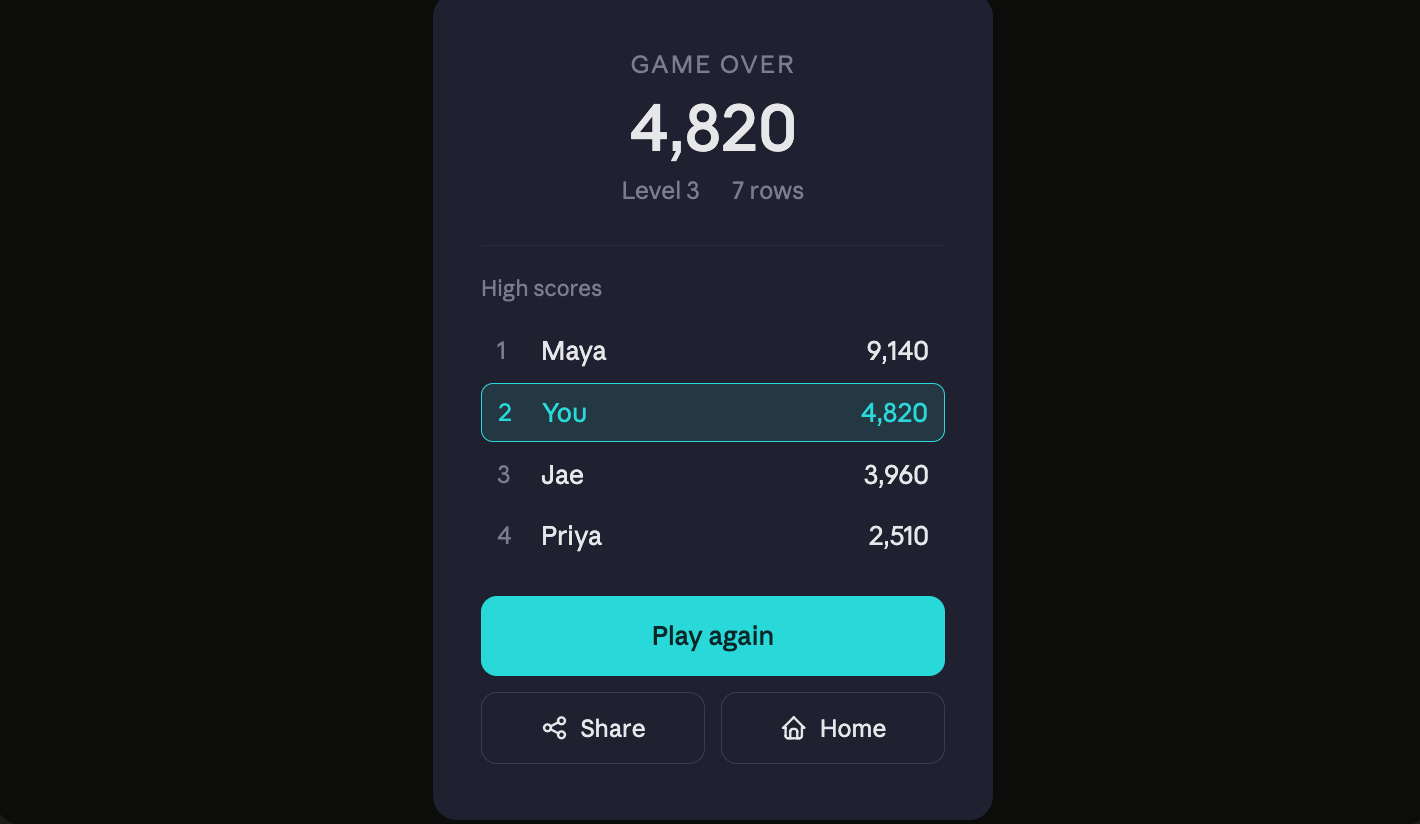
The result I actually loved, and quickly implemented.
...
I wanted to implement a stack based UI. If you haven't heard about this before, it seems to be pretty common place in game development and I've done some in the past using SFML2.
The idea is you have a stack of UI components that you can call render() on. The basic idea of this is you can iterate through your UI and show UI components like modals really easily. I thought I programmed the project with this idea.
The way I implemented this was with inheritance. I have the top level class...
import { GetElementById } from "../util";

export default abstract class Page {

    protected parentElement: HTMLDivElement;

    constructor(id: string) {
        this.parentElement = GetElementById(id) as HTMLDivElement;
    }

    public hide() {
        this.parentElement.style.display = "none";
    }

    public show() {
        this.parentElement.style.display = "block";
    }
}
Which then could be implemented by different classes like the main menu class to setup the environment listeners already on the page.
import Page from "./Page";
import StateManager from "../StateManager";
import { GetElementById } from "../util";

export default class MainMenuPage extends Page {

    private playBtn: HTMLButtonElement;
    private customGameBtn: HTMLButtonElement;
    private howToPlayBtn: HTMLButtonElement;

    constructor() {
        super("main-menu-page");
        this.playBtn = GetElementById('main-menu-play') as HTMLButtonElement;
        this.customGameBtn = GetElementById('main-menu-custom-game') as HTMLButtonElement;
        this.howToPlayBtn = GetElementById('main-menu-how-to-play') as HTMLButtonElement;

        this.playBtn.addEventListener('click', this.playGame);
        this.customGameBtn.addEventListener('click', this.customGame);
        this.howToPlayBtn.addEventListener('click', this.howToPlay);
    }

    playGame = () => {
        StateManager.GetInstance().GoToGameAndStartGame();
    }

    customGame = () => {
        StateManager.GetInstance().GoToCustomGame();
    }

    howToPlay = () => {
        StateManager.GetInstance().PushToHowToPlayModal();
    }
}
I'll end the article there, I have an input controller implemented in javascript so that touch events, mouse events and keyboards all work together but I think that would be more interesting for you to just read the code of.
The game is hosted at https://tetris.alecdivito.com. It would mean a lot if you'd go give it a spin!
Finally here is the implemented game.
Thanks for reading!
What about AI?
And what did it do?
When I was interested in completing Tetris, the goal was to not use AI. For the past year I've used it extensively at work and in my free time and I wanted a break. I was scared my skills would become worse. Therefore, the majority of changes, they didn't include AI at all.
But then I got to the point where the UI wasn't optimized for mobile...
and the layout for mobile and desktop were a lot different...
and the touch controls controls had some wonkyness to them...
These are just the type of bugs you get when only 10% of the project is left. This was just a personal project, something that was supposed to be completed long ago and it wasn't and its usefulness is not the same as what it would have provided me years ago.
Therefore, I used AI so polish the project, fix bugs in touch inputs for mobile and got it to redesign all the css for the game board page.
I guess if this project has taught me anything, especially in programming in my free time, is to do the stuff I enjoy and leave the stuff that I don't love to the AI. Just have fun.
Anyways, the design works on mobile and desktop now. I am not in love but it's good enough for a side project game.